Flutter Engine Uber Docs
Docs for the entire Flutter Engine repo.
 
Loading...
Searching...
No Matches
FlutterKeyboardInsetManager Class Reference

Coordinates the animation of the bottom viewport inset in response to system keyboard visibility changes. More...

#include <FlutterKeyboardInsetManager.h>
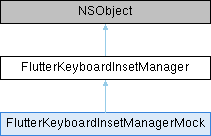
Inheritance diagram for FlutterKeyboardInsetManager:
FlutterKeyboardInsetManagerMock

Instance Methods

(instancetype) - initWithDelegate:
 Initializes the manager with a delegate.
 
(void) - handleKeyboardNotification:
 Processes a system keyboard notification to update the target inset and begin any necessary animations.
 
(void) - hideKeyboardImmediately
 Immediately stops any active keyboard animations and synchronizes the engine's viewport metrics with a zero inset.
 
(void) - invalidate
 Terminates any active animations and releases internal resources.
 

Properties

CGFloat targetViewInsetBottom
 The physical pixel value of the bottom inset once the current animation reaches its final state.
 
BOOL isKeyboardInOrTransitioningFromBackground
 Indicates whether the keyboard is currently onscreen or in the process of transitioning from the background.
 

Detailed Description

Coordinates the animation of the bottom viewport inset in response to system keyboard visibility changes.

This manager translates native iOS keyboard notifications into pixel insets for the engine. It ensures that the Flutter app UI correctly resizes or scrolls when the software keyboard appears or disappears.

We synchronize the app's layout transitions with the native keyboard animation curve by tracking a hidden internal view. When a keyboard notification is received, this view is animated using the native iOS duration and curve. The manager tracks this animation and calls the delegate's update methods on every vsync pulse until the transition completes.

iOS doesn't provide us with a frame-by-frame callback for keyboard transitions, but we need to animate our views smoothly to account for keyboard size/position changes. To ensure Flutter's layout animates in perfect sync with the system keyboard, we use a "hidden view" synchronization trick:

  • When a keyboard notification (e.g., UIKeyboardWillShow) is received, the manager animates a hidden UIView's frame using the native iOS duration and curve.
  • A FlutterVSyncClient tracks the 'presentationLayer' of this hidden view on every vsync.
  • The intermediate positions are then translated into physical pixel insets and sent to the engine until the animation completes.

To prevent incorrect layout shifts, the manager filters notifications based on the following criteria:

  • Local notifications: In multitasking environments, such as iPad Split View, notifications triggered by interactions with other applications are ignored.
  • Keyboard attachment mode: The manager distinguishes between "docked" keyboards, which cover the bottom of the viewport, and "floating" or "undocked" keyboards. Floating keyboards do not typically require a viewport inset and are ignored to allow them to hover over the Flutter content without resizing the layout.
  • View lifecycle: Notifications are ignored if the associated view is not loaded or if the delegate is not the active view controller.
See also
[FlutterViewController], which owns this manager and acts as its delegate.

Definition at line 107 of file FlutterKeyboardInsetManager.h.

Method Documentation

◆ handleKeyboardNotification:

- (void) handleKeyboardNotification: (NSNotification*)  notification

Processes a system keyboard notification to update the target inset and begin any necessary animations.

Consider calling this method from the view controller's keyboard notification observers. It automatically performs filtering for non-local or floating keyboard events.

Parameters
notificationThe notification received from the [NSNotificationCenter].

Definition at line 27 of file FlutterKeyboardInsetManager.mm.

42 :(NSNotification*)notification {
43 // See https://flutter.dev/go/ios-keyboard-calculating-inset for more details
44 // on why notifications are used and how things are calculated.
45 id<FlutterKeyboardInsetManagerDelegate> delegate = self.delegate;
46 if (!delegate || [self shouldIgnoreKeyboardNotification:notification]) {
47 return;
48 }
49
50 NSDictionary* info = notification.userInfo;
51 CGRect beginKeyboardFrame = [info[UIKeyboardFrameBeginUserInfoKey] CGRectValue];
52 CGRect keyboardFrame = [info[UIKeyboardFrameEndUserInfoKey] CGRectValue];
53 FlutterKeyboardMode keyboardMode = [self calculateKeyboardAttachMode:notification];
54 CGFloat calculatedInset = [self calculateKeyboardInset:keyboardFrame keyboardMode:keyboardMode];
55 NSTimeInterval duration = [info[UIKeyboardAnimationDurationUserInfoKey] doubleValue];
56
57 // If the software keyboard is displayed before displaying the PasswordManager prompt,
58 // UIKeyboardWillHideNotification will occur immediately after UIKeyboardWillShowNotification.
59 // The duration of the animation will be 0.0, and the calculated inset will be 0.0.
60 // In this case, it is necessary to cancel the animation and hide the keyboard immediately.
61 // https://github.com/flutter/flutter/pull/164884
62 if (keyboardMode == FlutterKeyboardModeHidden && calculatedInset == 0.0 && duration == 0.0) {
63 [self hideKeyboardImmediately];
64 return;
65 }
66
67 // Avoid double triggering startKeyBoardAnimation.
68 if (self.targetViewInsetBottom == calculatedInset) {
69 return;
70 }
71 self.targetViewInsetBottom = calculatedInset;
72
73 // Flag for simultaneous compounding animation calls.
74 // This captures animation calls made while the keyboard animation is currently animating. If the
75 // new animation is in the same direction as the current animation, this flag lets the current
76 // animation continue with an updated targetViewInsetBottom instead of starting a new keyboard
77 // animation. This allows for smoother keyboard animation interpolation.
78 BOOL keyboardWillShow = beginKeyboardFrame.origin.y > keyboardFrame.origin.y;
79 BOOL keyboardAnimationIsCompounding =
80 self.keyboardAnimationIsShowing == keyboardWillShow && _keyboardAnimationVSyncClient != nil;
81
82 // Mark keyboard as showing or hiding.
83 self.keyboardAnimationIsShowing = keyboardWillShow;
84
85 if (!keyboardAnimationIsCompounding) {
86 [self startKeyBoardAnimation:duration];
87 } else if (self.keyboardSpringAnimation) {
88 self.keyboardSpringAnimation.toValue = self.targetViewInsetBottom;
89 }
90}
CGFloat targetViewInsetBottom
The physical pixel value of the bottom inset once the current animation reaches its final state.
int BOOL

References self.

◆ hideKeyboardImmediately

- (void) hideKeyboardImmediately

Immediately stops any active keyboard animations and synchronizes the engine's viewport metrics with a zero inset.

Definition at line 27 of file FlutterKeyboardInsetManager.mm.

318 {
319 [self invalidateKeyboardAnimationVSyncClient];
320 if (self.keyboardAnimationView) {
321 [self.keyboardAnimationView.layer removeAllAnimations];
322 [self removeKeyboardAnimationView];
323 self.keyboardAnimationView = nil;
324 }
325 if (self.keyboardSpringAnimation) {
326 self.keyboardSpringAnimation = nil;
327 }
328 self.targetViewInsetBottom = 0.0;
329 [self ensureViewportMetricsIsCorrect];
330}

◆ initWithDelegate:

- (instancetype) initWithDelegate: (id<FlutterKeyboardInsetManagerDelegate>)  delegate

Initializes the manager with a delegate.

The manager maintains a weak reference to the delegate.

Parameters
delegateThe object that handles viewport updates. Typically a [FlutterViewController].

Definition at line 27 of file FlutterKeyboardInsetManager.mm.

33 :(id<FlutterKeyboardInsetManagerDelegate>)delegate {
34 self = [super init];
35 if (self) {
36 _delegate = delegate;
37 _targetViewInsetBottom = 0.0;
38 }
39 return self;
40}

◆ invalidate

- (void) invalidate

Terminates any active animations and releases internal resources.

Consider calling this method when the owner of the manager is being deallocated.

Definition at line 27 of file FlutterKeyboardInsetManager.mm.

430 {
431 [self invalidateKeyboardAnimationVSyncClient];
432 [self removeKeyboardAnimationView];
433}

Property Documentation

◆ isKeyboardInOrTransitioningFromBackground

- (BOOL) isKeyboardInOrTransitioningFromBackground
readwritenonatomicassign

Indicates whether the keyboard is currently onscreen or in the process of transitioning from the background.

Definition at line 152 of file FlutterKeyboardInsetManager.h.

◆ targetViewInsetBottom

- (CGFloat) targetViewInsetBottom
readnonatomicassign

The physical pixel value of the bottom inset once the current animation reaches its final state.

Definition at line 146 of file FlutterKeyboardInsetManager.h.


The documentation for this class was generated from the following files: